
Conditional Email Routing For Contact Form 7​

Routes email to different recipients based on form field values in Contact Form 7.

CF7
Downloads
0 +
Happy customers
0 +
Free Users
0 +
Pro Users
0 +

Why Use Conditional Email Routing?

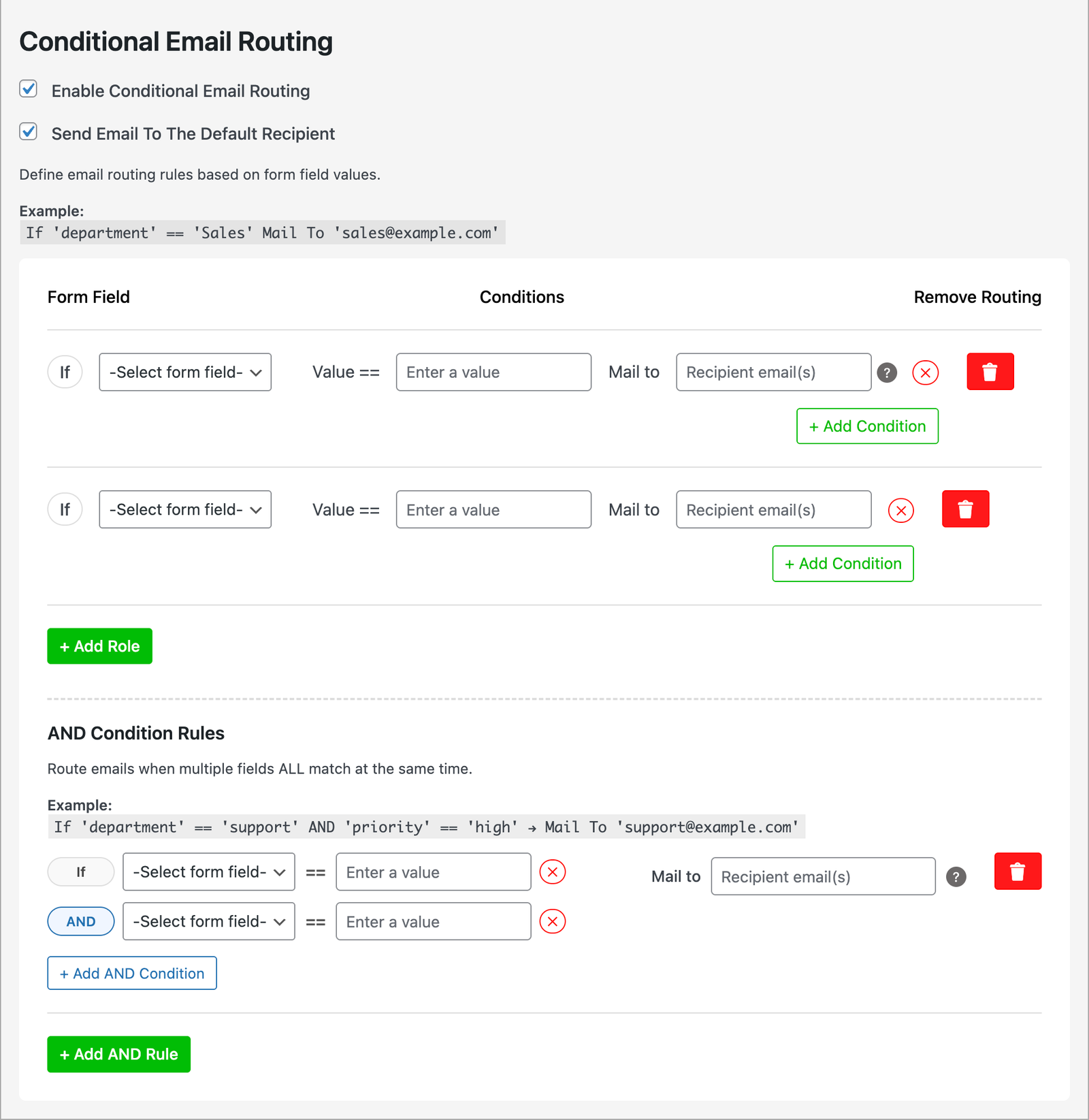
With this Contact Form 7 addon, you can create smart and customized email routing logic. Based on form field selections like dropdowns, radio buttons, or checkboxes, your Contact Form 7 forms can send different email messages to different recipients.

Conditional Email Routing

Send form submissions to different recipients automatically based on user-selected form field values.

Multiple Conditional Rules

Create unlimited conditional rules with a clean, visual interface. Each rule can target a specific field and define multiple conditions under it.

Default Recipient Control

Option to enable or disable sending emails to the default recipient when conditional routing is active.

Dynamic Mail 2 Templates

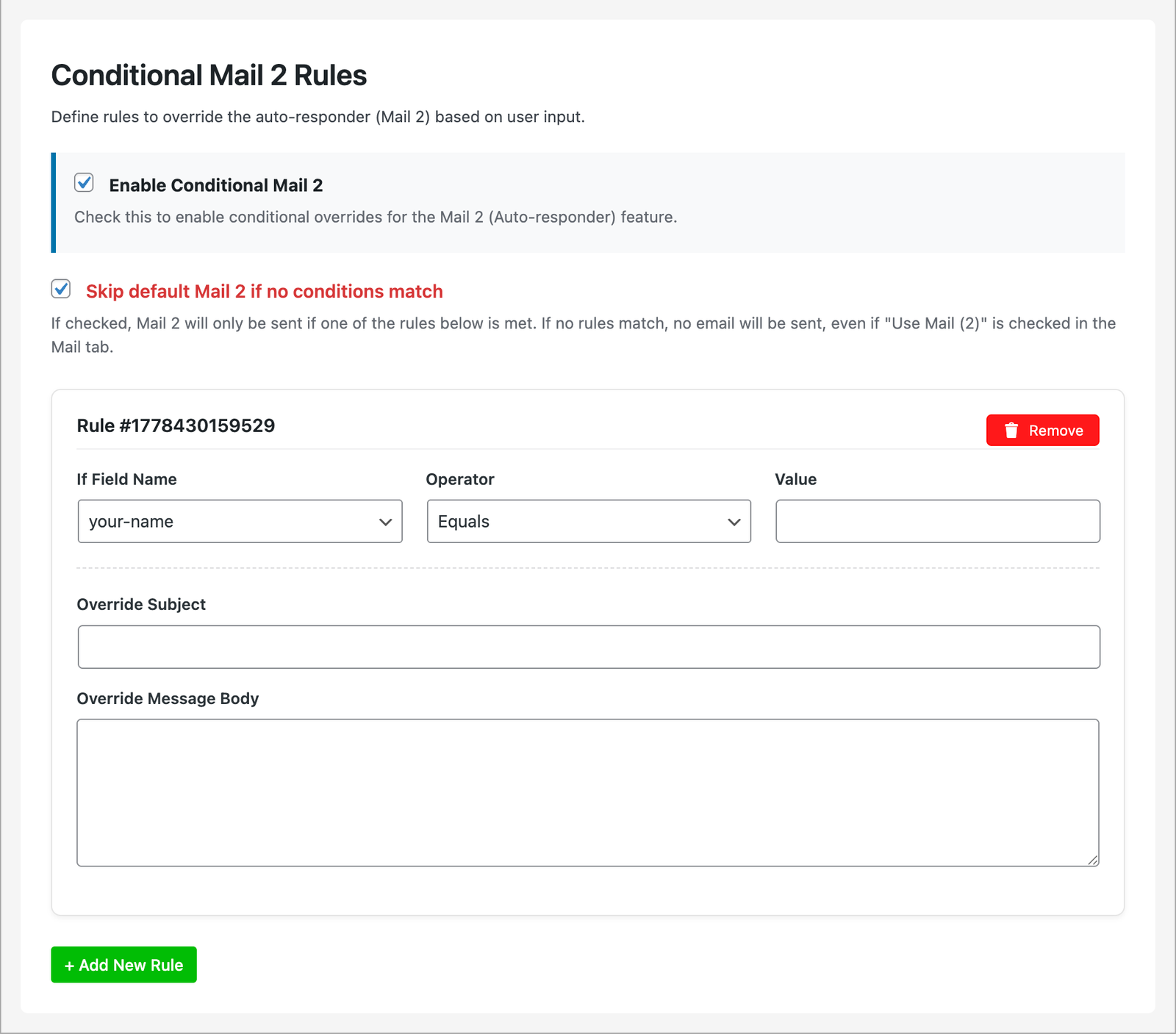
Send personalized auto-responder emails based on user selections and form inputs.

User-Friendly Interface

Easily add, remove, or modify routing rules directly from the Contact Form 7 editor under a dedicated "Conditional Email Routing" tab.

No Coding Required

All settings are configured visually in the WordPress dashboard — no PHP or shortcode editing needed.

Why Use Conditional Email Routing?

With this Contact Form 7 addon, you can create smart and customized email routing logic. Based on form field selections like dropdowns, radio buttons, or checkboxes, your Contact Form 7 forms can send different email messages to different recipients.

Conditional Email Routing

Send form submissions to different recipients automatically based on user-selected form field values.

Multiple Conditional Rules

Create unlimited conditional rules with a clean, visual interface. Each rule can target a specific field and define multiple conditions under it.

Default Recipient Control

Option to enable or disable sending emails to the default recipient when conditional routing is active.

Dynamic Mail 2 Templates

Send personalized auto-responder emails based on user selections and form inputs.

User-Friendly Interface

Easily add, remove, or modify routing rules directly from the Contact Form 7 editor under a dedicated "Conditional Email Routing" tab.

No Coding Required

All settings are configured visually in the WordPress dashboard — no PHP or shortcode editing needed.

Key Features

Conditional Email Routing

Route every submission to exactly the right inbox

🔁
Route emails based on form field values in Contact Form 7
📩
Send to different recipients based on dropdown, checkbox, or radio selections
🧩
Add multiple routing conditions inside a single form
🚫
Disable the default email sending and define custom recipients
🧠
Intelligent conditional logic for CF7 email routing
🧷
Fully integrated into the Contact Form 7 editor interface
🧰
Supports checkboxes, dropdowns, radio buttons, and more
💼
Ideal for multi-department forms: Sales, Support, HR, and more
⚙️
Lightweight, flexible, and easy to set up
🔌
Works as a native CF7 extension — no complex setup required
Conditional Mail 2

Personalize every auto-responder based on user input

📧
Create conditional Mail 2 auto-responders based on user input in CF7
📝
Override the default Mail 2 subject and message body dynamically
🎯
Send personalized confirmation or follow-up emails based on selections
🧩
Add multiple rules for advanced auto-responder workflows
🚫
Skip the default Mail 2 email entirely when no conditions match
🧠
Smart logic with operators: equals, not equals, contains, and more
🧷
Fully integrated into the Contact Form 7 editor interface
🧰
Supports dropdowns, checkboxes, radio buttons, text fields, and more
🌍
Deliver language-specific, country-specific, or department-specific responses
💼
Perfect for support forms, sales inquiries, registrations, and onboarding
Lightweight, flexible, and easy to configure
🔌
Works as a native CF7 extension with a seamless setup experience

Key Features

  • 🔀Route emails based on form field values in Contact Form 7.
  • 📩Send emails to different recipients based on dropdown, checkbox, or radio button selections.
  • 🧩Add multiple routing conditions in your Contact Form 7 forms.
  • Disable the default email sending and define custom recipients.
  • 🧠Intelligent conditional logic for Contact Form 7 email routing.
  • 🛠️Fully integrated into the Contact Form 7 editor interface.
  • 💼Supports various field types like checkboxes, dropdowns, radio buttons, etc.
  • 🏢Ideal for multi-department forms: Sales, Support, HR, etc.
  • ⚙️Lightweight, flexible, and easy to set up.
  • 🖋️Works as a native Contact Form 7 extension — no complex setup required.

Intelligent Routing in Action

Discover powerful, real-world examples of how Conditional Email Routing transforms generic form submissions into smart, automated business workflows.

🎫 Customer Support

Intelligent Support Ticket Routing

Instantly send customer inquiries to the precise team or individual based on a dropdown or radio button selection within your form.

When a customer selects "Technical Support," the email routes directly to your tech team's shared inbox. Sales inquiries go straight to the sales channel—**no more manual forwarding.**

🎯 Result: Faster first-response times, enhanced customer satisfaction, and eliminated internal friction from manual sorting.

Get It Now
Incoming Form Category: Sales Category: Support Category: Tech Rule Sales Inbox Support Ticket Tech Channel
🌍 Rule Europe Team Active Americas Team Inactive Asia Team Inactive
🌍 Global Operations

Automated Regional Routing

Route form submissions to specific regional sales or support teams based on the selected country or location.

Perfect for international businesses. Inquiries from Germany land with your European team, and those from India reach your Asia-Pacific specialist, ensuring local expertise and correct timezone handling.

🎯 Result: Improved service quality due to local knowledge, faster turnaround times, and consistent language support.

Get It Now
💼 Sales & Marketing

Specialized Sales Inquiry Forwarding

Match leads directly to the specialist best equipped to handle their specific product or service interest.

If a visitor is interested in "Service B," the system bypasses the general inbox and routes the inquiry straight to Sarah Johnson, the dedicated service specialist.

🎯 Result: Higher conversion rates, expert advice from the first touchpoint, and streamlined lead management.

Get It Now
Product Interest Filter Service B (Active) Product A Software C Match Sarah J. Service Lead Mike C. Product Lead
Direct Contact Person Mike Davis Jane Wilson Emma Garcia Direct Route Mike's Inbox mike@example.com Jane's Inbox jane@example.com
👥 Direct Communication

Direct Contact Person Selection

Empower users to choose their desired recipient from a predefined list, ensuring personal and immediate routing.

Visitors select "Mike Davis (Sales Director)" from a list of contacts. The form is then conditionally routed directly to Mike's personal email, bypassing any general team inbox entirely.

🎯 Result: Highly personalized service, minimized processing delays, and a better initial customer experience.

Get It Now

Choose Your Pro Plan

Unlock all premium features for Conditional Email Routing For Contact Form 7

Yearly Plan
Get access to all pro features with annual billing
$ 22 / year
Billed annually
  • Unlimited site licenses
  • Unlimited routing rules
  • Multiple conditions per rule
  • Advanced conditional logic
  • Conditional mail 2 template
  • Priority email support
  • Regular updates & new features
  • 1 year of updates & support
Buy Yearly Plan
Risk-free, 14 Days Money Back Guarantee!
14
Days

100% Money Back Guarantee

Try our product risk-free for 14 days. If you're not completely satisfied, we'll refund your purchase—no questions asked.

Full refund within 14 days
No questions asked policy
Fast and easy refund process
View our full refund policy

Frequently Asked Questions

Yes. This plugin is an extension of Contact Form 7, so it requires Contact Form 7 to be installed and activated.

Absolutely. You can define multiple conditions and route emails to different recipients depending on form selections made by the user.

Yes. The plugin works with standard and custom fields created using Contact Form 7, including dropdowns, checkboxes, and radio buttons.

Yes. The plugin is tested and fully compatible with the latest version of WordPress and Contact Form 7. For best performance, keep your WordPress installation up to date.

Yes. You can add different email routing rules to each individual Contact Form 7 form on your site.