
100% Money Back Guarantee
Try our product risk-free for 14 days. If you're not completely satisfied, we'll refund your purchase—no questions asked.
Routes email to different recipients based on form field values in Contact Form 7.
With this Contact Form 7 addon, you can create smart and customized email routing logic. Based on form field selections like dropdowns, radio buttons, or checkboxes, your Contact Form 7 forms can send different email messages to different recipients.
Send form submissions to different recipients automatically based on user-selected form field values.
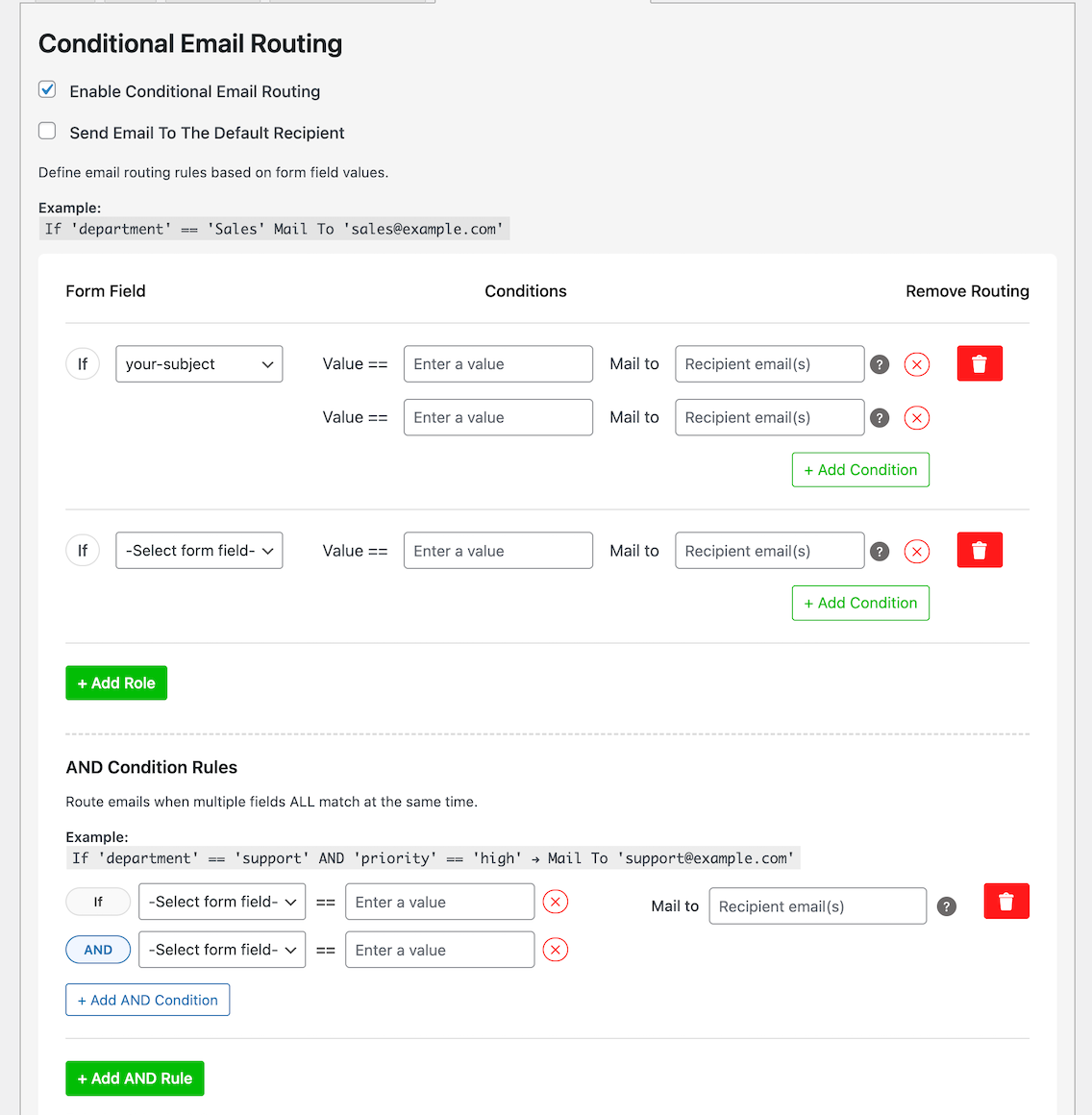
Create unlimited conditional rules with a clean, visual interface. Each rule can target a specific field and define multiple conditions under it.
Option to enable or disable sending emails to the default recipient when conditional routing is active.
Easily add, remove, or modify routing rules directly from the Contact Form 7 editor under a dedicated "Conditional Email Routing" tab.
All settings are configured visually in the WordPress dashboard — no PHP or shortcode editing needed.
Send customized email templates (Mail 2) based on user selections — for example, send a video streaming link to global users or a downloadable ZIP link for users in China.
Discover powerful, real-world examples of how Conditional Email Routing transforms generic form submissions into smart, automated business workflows.
Instantly send customer inquiries to the precise team or individual based on a dropdown or radio button selection within your form.
When a customer selects "Technical Support," the email routes directly to your tech team's shared inbox. Sales inquiries go straight to the sales channel—**no more manual forwarding.**
🎯 Result: Faster first-response times, enhanced customer satisfaction, and eliminated internal friction from manual sorting.
Get It NowRoute form submissions to specific regional sales or support teams based on the selected country or location.
Perfect for international businesses. Inquiries from Germany land with your European team, and those from India reach your Asia-Pacific specialist, ensuring local expertise and correct timezone handling.
🎯 Result: Improved service quality due to local knowledge, faster turnaround times, and consistent language support.
Get It NowMatch leads directly to the specialist best equipped to handle their specific product or service interest.
If a visitor is interested in "Service B," the system bypasses the general inbox and routes the inquiry straight to Sarah Johnson, the dedicated service specialist.
🎯 Result: Higher conversion rates, expert advice from the first touchpoint, and streamlined lead management.
Get It NowEmpower users to choose their desired recipient from a predefined list, ensuring personal and immediate routing.
Visitors select "Mike Davis (Sales Director)" from a list of contacts. The form is then conditionally routed directly to Mike's personal email, bypassing any general team inbox entirely.
🎯 Result: Highly personalized service, minimized processing delays, and a better initial customer experience.
Get It NowUnlock all premium features for Conditional Email Routing For Contact Form 7
Try our product risk-free for 14 days. If you're not completely satisfied, we'll refund your purchase—no questions asked.
Yes. This plugin is an extension of Contact Form 7, so it requires Contact Form 7 to be installed and activated.
Absolutely. You can define multiple conditions and route emails to different recipients depending on form selections made by the user.
Yes. The plugin works with standard and custom fields created using Contact Form 7, including dropdowns, checkboxes, and radio buttons.
Yes. The plugin is tested and fully compatible with the latest version of WordPress and Contact Form 7. For best performance, keep your WordPress installation up to date.
Yes. You can add different email routing rules to each individual Contact Form 7 form on your site.